
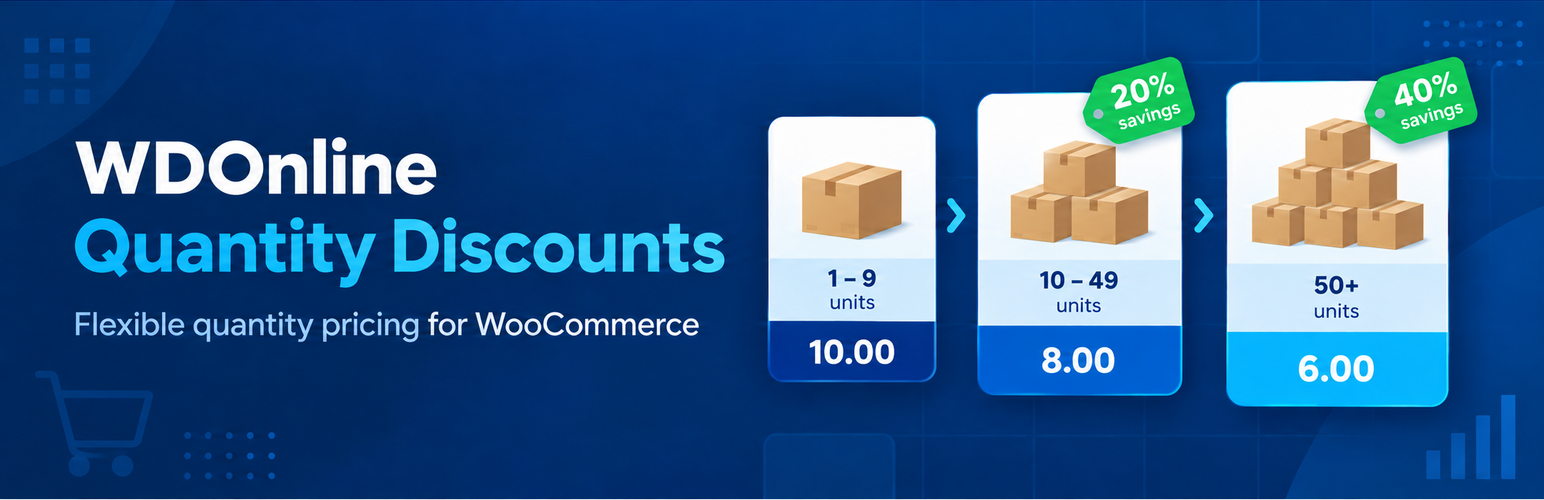
Powerful and flexible quantity pricing for WooCommerce
Encourage customers to buy more by offering clear, attractive quantity discounts directly on your WooCommerce products. WDOnline Quantity Discounts makes it easy to create tiered pricing based on the quantity added to the cart. Offer a lower unit price when customers purchase three, five, ten or any other quantity you define—without complicated setup or manual coupon codes. Whether you sell individual products, wholesale quantities, multipacks or volume-based supplies, the plugin gives you precise control over your pricing while clearly showing customers how much they can save.Turn larger quantities into larger orders
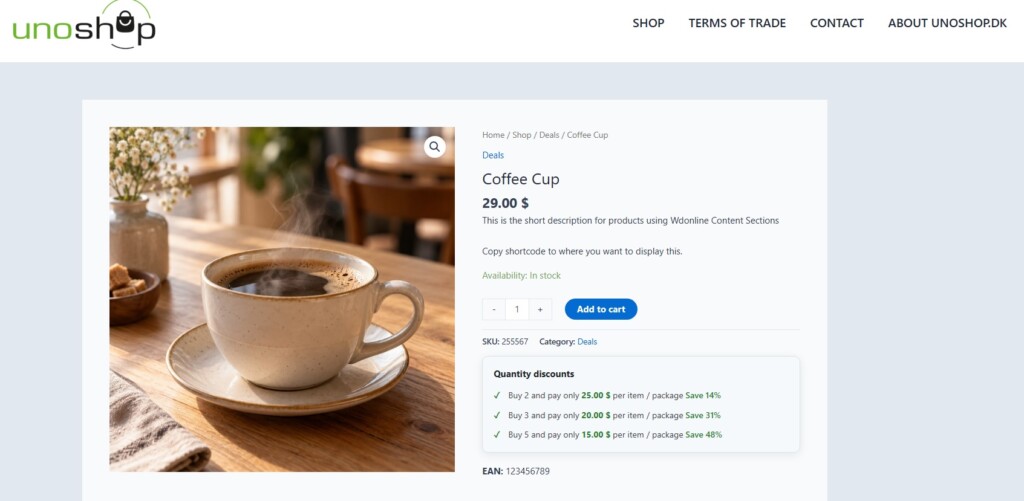
Quantity discounts give customers a strong reason to increase their order size. Instead of searching for coupon codes, customers can immediately see the available pricing tiers on the product page. For example:- Buy 3 or more for €8.00 each
- Buy 5 or more for €7.00 each
- Buy 10 or more for €6.50 each
Flexible discount rules
Create quantity-based pricing using either fixed unit prices or percentage discounts. This allows you to choose the pricing method that best matches each product and sales strategy. Rules can be configured for individual products, product variations or entire product categories. You remain in control of where discounts apply and how they are calculated.Built for simple and variable products
WDOnline Quantity Discounts works with both simple and variable WooCommerce products. Each variation can have its own quantity discount structure, allowing different sizes, colours, packages or product configurations to use separate pricing rules. Where appropriate, variations can also inherit rules from their parent product.Clear pricing on the product page
Customers should never have to guess how much they will pay. The plugin can display an easy-to-understand quantity discount table directly on the product page. Available quantity levels and prices are presented before the customer adds the product to the cart, making the buying decision simpler and more transparent. Optional messages can also be displayed on shop and product category pages to draw attention to products with volume pricing.Customisable frontend design
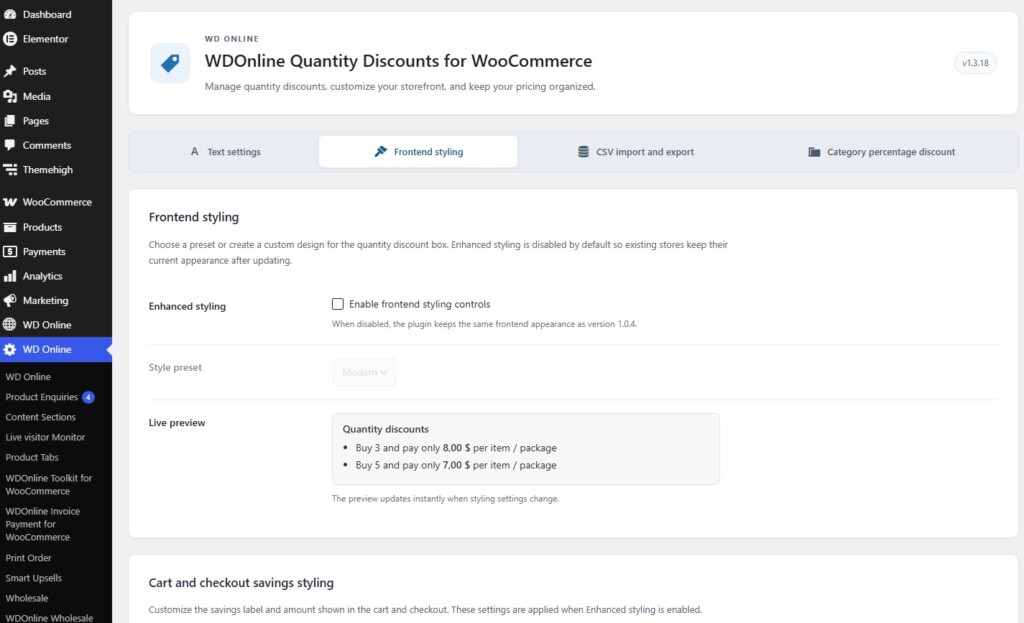
Adjust the appearance of the quantity discount display to match your store. The plugin includes styling options that let you control how pricing tiers and promotional messages appear on the frontend. Enhanced styling can be enabled when needed or left disabled to inherit the appearance of your active WordPress theme.Category-wide quantity discounts
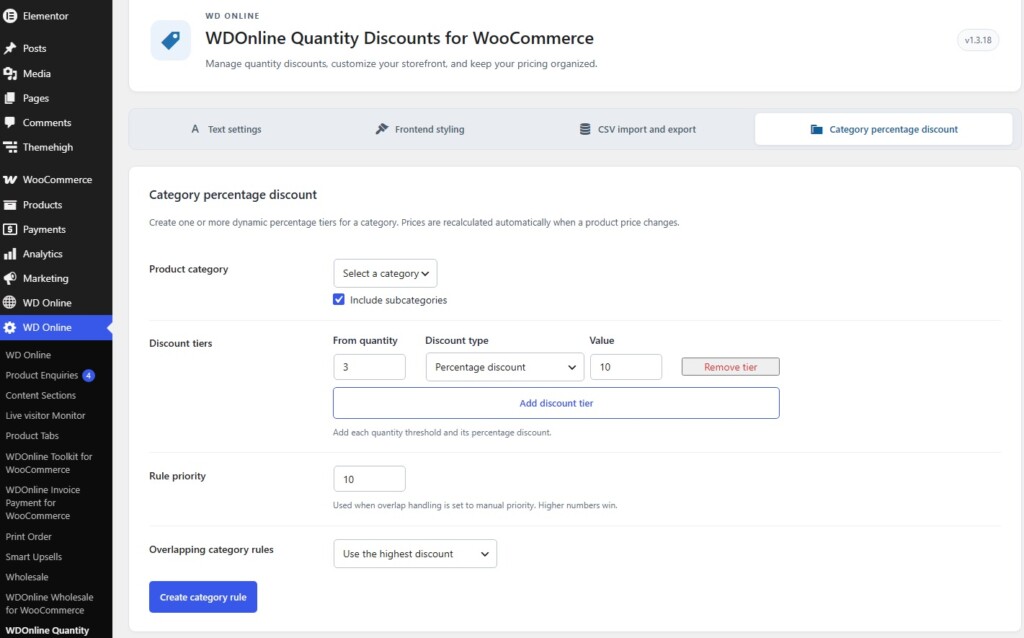
Apply percentage-based quantity discounts to an entire product category without editing every product individually. This is ideal for wholesale ranges, promotional collections or product groups that share the same discount structure. Category rules can be managed centrally, making large catalogues faster and easier to maintain.Efficient import and export
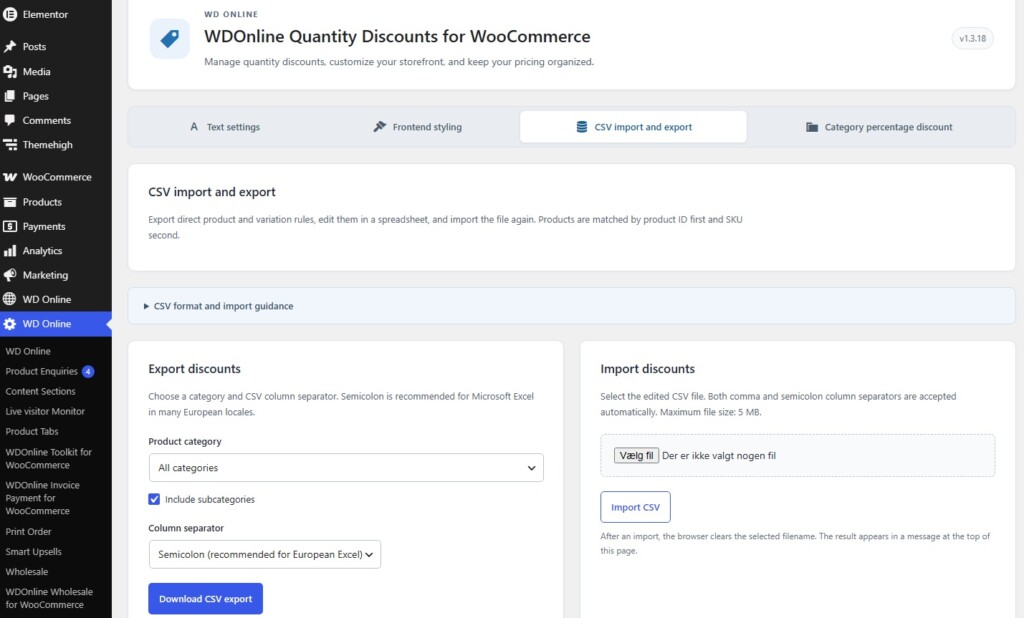
Manage quantity discounts across multiple products using CSV import and export. Export existing pricing rules, make changes in a spreadsheet and import the updated file back into WooCommerce. Product information, regular prices, sale prices and quantity discount rules can be included, making it easier to review and maintain larger catalogues. The plugin also integrates with WooCommerce product export data, helping quantity pricing fit naturally into existing store-management workflows.Optional scheduling
Create quantity discount campaigns that are available only during a specific period. Scheduled rules are useful for seasonal promotions, limited-time wholesale offers and other campaigns where discounted pricing should start and end automatically.Designed for real WooCommerce stores
WDOnline Quantity Discounts is designed to provide practical pricing tools without adding unnecessary complexity. The plugin follows WordPress and WooCommerce standards, supports translation and works with tools such as Loco Translate. Its settings are organised within the shared WD Online administration menu, while the plugin continues to work independently without requiring an additional core plugin.Key features
- Quantity-based pricing for WooCommerce
- Fixed unit prices or percentage discounts
- Support for simple and variable products
- Individual pricing rules for product variations
- Category-based percentage discounts
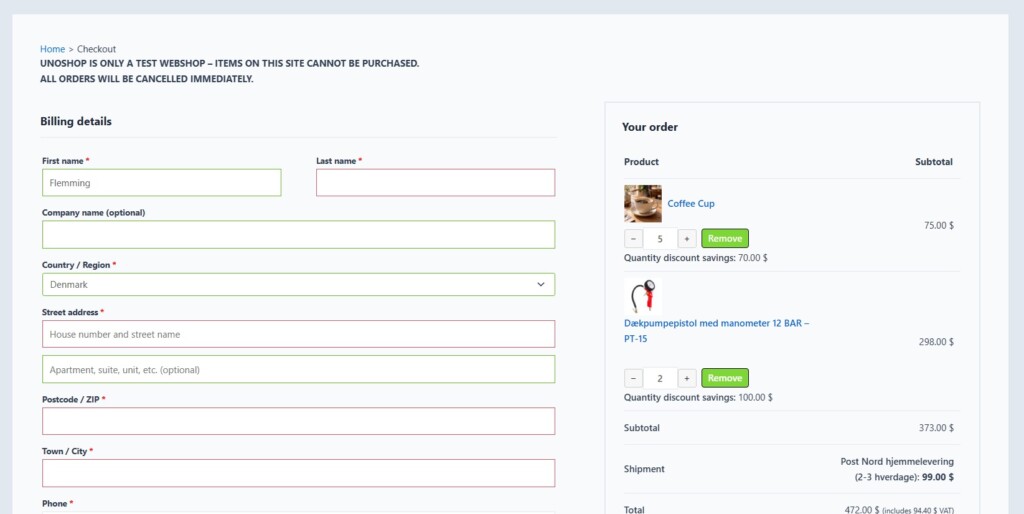
- Automatic discount calculation in the cart and checkout
- Clear quantity pricing tables on product pages
- Optional promotional messages on shop and category pages
- Customisable frontend styling
- Scheduled discount periods
- CSV import and export
- WooCommerce export compatibility
- Translation-ready and compatible with Loco Translate
- No coupon codes required
- No separate WD Online core plugin required
Give customers a reason to buy more
With WDOnline Quantity Discounts, volume pricing becomes visible, automatic and easy to manage. Create compelling quantity offers, communicate savings clearly and increase the value of every order—all from within WooCommerce.WDOnline Quantity Discounts for WooCommerce lets you offer lower unit prices when customers buy a specified quantity. You can create fixed unit prices or percentage discounts for individual products and variations, and percentage rules for entire product categories. The applicable price is calculated automatically in the cart and checkout.
Requirements and installation
The plugin requires an active WooCommerce installation. In your WordPress dashboard, go to Plugins → Add New Plugin → Upload Plugin, choose the plugin ZIP file, install it, and activate it. The settings page then appears under WD Online → WDOnline Quantity Discounts for WooCommerce. To try it quickly, edit a simple product with a regular price, add a quantity tier in Product data → General, update the product, and add enough units to your cart to reach the tier. Check the product page and cart to confirm the display and price.Create discounts for a simple product
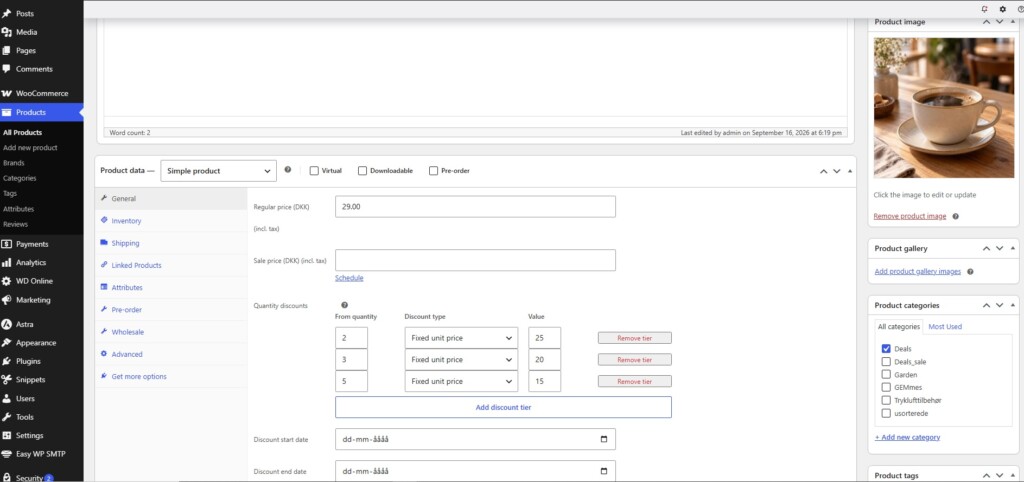
- Go to Products → All Products and edit the product.
- In Product data → General, find Quantity discounts near the price fields.
- Use the visual tier builder to add a From quantity, choose Fixed unit price or Percentage discount, and enter a value. Add more rows for additional thresholds.
- Update the product and test the quantities on its storefront page.
3|8
5|7
10|6.53|10 and 5|15, then generate fixed prices from the current comparison price. Use a percentage tier in the visual builder instead if the discounted amount should change automatically when the product price changes.
Schedule a product discount
Set Discount start date and/or Discount end date in the product's pricing area to limit when its direct rules apply. Leave either date empty for an open-ended period. The date check uses your WordPress site's time zone. The end date cannot be earlier than the start date.Set discounts for variations
For a variable product, open Product data → Variations and expand the variation you want to edit. Each variation has its own Variation quantity discounts tiers and optional start and end dates. Save the variation and update the parent product. Repeat for other variations as needed. The storefront tier display updates when a customer selects a variation. Each variation uses its own direct rules. If it has no direct rules, a matching category rule can apply; it does not inherit the parent product's direct tiers. Check the regular or sale price of each variation before creating percentage tiers.Create category percentage discounts
Open WD Online → WDOnline Quantity Discounts for WooCommerce → Category percentage discount.- Select a Product category and choose whether to Include subcategories.
- Add one or more Discount tiers, each with a minimum quantity and percentage.
- Optionally set Rule priority if you plan to use manual priority for overlapping category rules. Higher numbers win.
- Choose Overlapping category rules: highest discount, lowest discount, most specific category, or manual priority.
- Click Create category rule.
Control the storefront display and price comparison
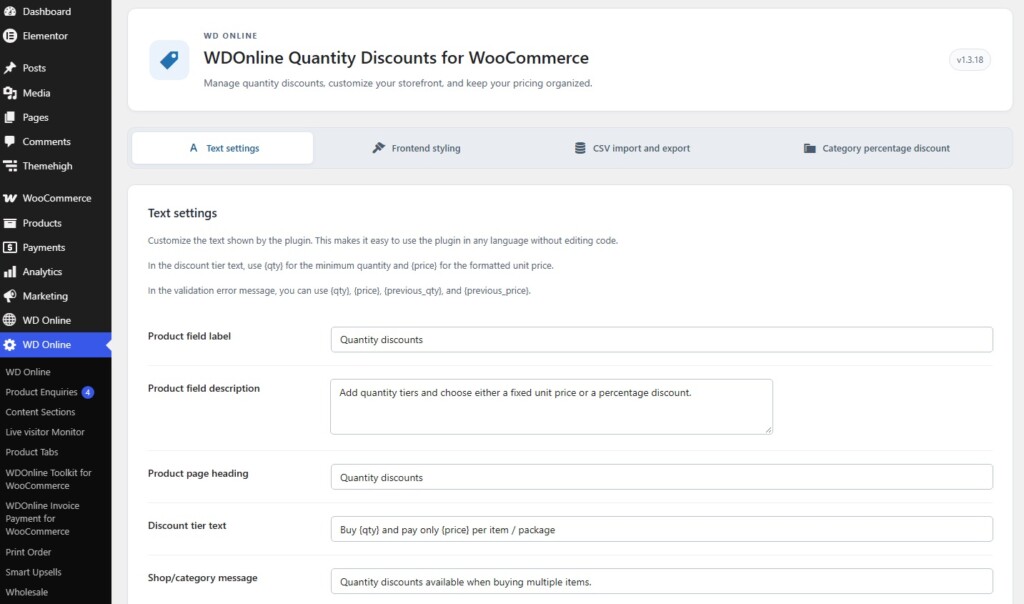
The plugin's settings page has four tabs: Text settings, Frontend styling, CSV import and export, and Category percentage discount. Display and pricing controls are on Frontend styling.- Show on product pages: Enable or disable the tier box on product pages.
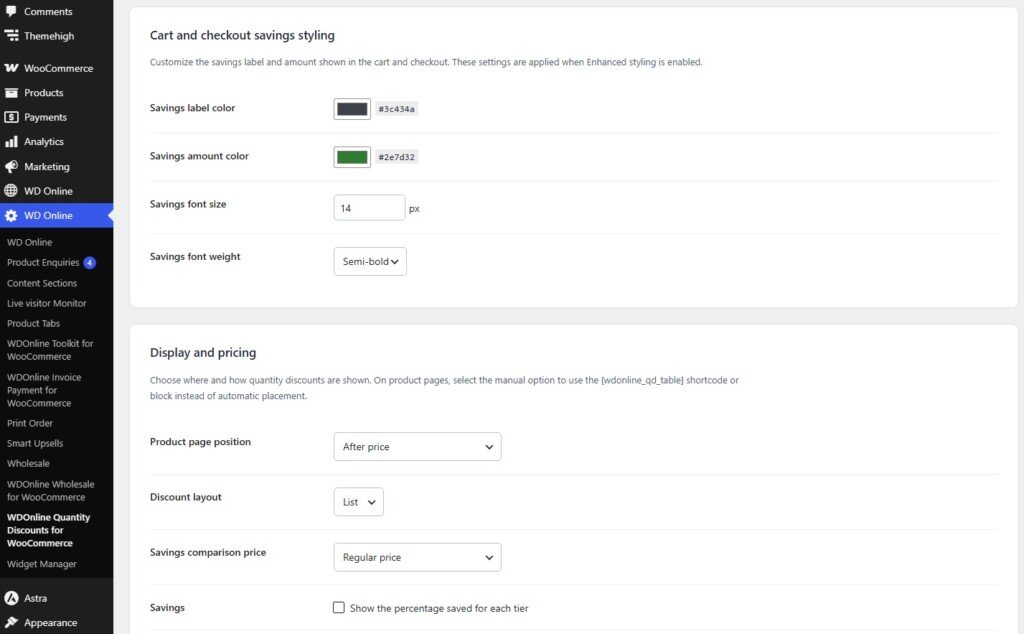
- Product page position: Place the box before or after the price, after the short description, before or after Add to cart, or choose Manual shortcode or block only.
- Discount layout: Display tiers as a list or table.
- Savings comparison price: Use the regular price, active sale price, or the lowest of those prices. This setting affects percentage calculations and the savings comparison. When Active sale price is selected and no sale is active, the plugin uses the regular price.
- Savings: Show or hide the percentage saved for each tier in the product-page box.
- Show on shop/category pages: Enable or disable the short discount message on product listings. This switch is in Text settings.
Use a shortcode or block
Select Manual shortcode or block only for Product page position when you want to place the tier box yourself. Insert the Quantity Discounts block or use this shortcode in product content:123 with the actual product ID. When an automatic product-page position is selected, the plugin suppresses a shortcode or block in that product's content to avoid a duplicate box. An explicit product ID can still be used on another page.
Show savings in the cart and checkout
Under Frontend styling → Display and pricing → Cart and checkout savings, choose Do not show savings, Show savings for each item, or Show total savings. Savings display is off by default. The plugin shows quantity-discount savings only when an active quantity tier actually supplies the final cart item price, so another price adjustment is not presented as a quantity discount. To change the label, open Text settings → Cart and checkout savings text. For its appearance, enable Enhanced styling and adjust Cart and checkout savings styling: label color, amount color, font size, and weight.Edit wording and design
Text settings
Use Text settings to change the product field label and description, product-page heading, discount tier text, shop/category message, cart and checkout savings label, and a validation error message. Save the tab after editing. The Discount tier text template needs both placeholders:{qty} for the minimum quantity and {price} for the formatted unit price. The validation message can use {qty}, {price}, {previous_qty}, and {previous_price}. You can also translate plugin strings with Loco Translate; the plugin includes a translation template.
Frontend styling
Enable Enhanced styling to activate the styling controls. Choose Classic, Minimal, Modern, or Custom. Custom settings include box and border colors, border radius, padding, heading and text sizes and colors, discount price color, tier markers, spacing, and a box shadow. The Live preview responds while you edit settings; click Save Changes to apply them on the site. Enhanced styling is disabled by default, preserving the existing appearance until you enable it.Export and import discounts with CSV
Open CSV import and export in the plugin settings. Export: Select all categories or one product category, optionally include subcategories, choose a comma or semicolon column separator, and click Download CSV export. Semicolons can be easier to work with in European Excel installations. The export contains direct product and variation rules; category percentage rules are managed separately in their own tab. Edit: Keep the header row intact. The CSV includes product ID, SKU, product name and type, regular and sale prices, quantity discount rules, visual rule rows, and start and end dates. Individual tiers inside thequantity_discounts cell always use semicolons, even if the CSV columns use commas:
3|8;5|7quantity_discounts changes those tiers to fixed-price rules. An unchanged exported percentage rule keeps its percentage type. The regular_price and sale_price columns can update prices for simple products and individual variations; an empty sale_price removes the sale price. Review price columns carefully before importing an edited file.
Import: Choose the edited CSV and click Import CSV. The importer detects comma or semicolon columns and accepts CSV files up to 5 MB. A result notice appears at the top of the tab and reports rows that were skipped. Test with a small export before changing a large catalog, and retain a copy of the original file.
Find products with discount rules
The Products list includes quantity-discount information, such as rule type, rule source, category rule, and lowest tier price, with filters to help find products with direct rules or missing discounts. For a specific variation, open the parent product and inspect that variation's pricing fields.Troubleshooting
The product-page box does not appear: Confirm the product has an applicable rule, product-page display is enabled, and any start or end date includes today. Check whether the selected position is Manual shortcode or block only. For variable products, select a variation that has direct rules or qualifies for a category rule. The cart price is unchanged: Add enough of the same product or variation to reach a tier, then check the rule values and dates. Product and variation rules are separate; a direct rule on a variable parent is not inherited by its variations. If another pricing extension changes the same cart line, review the final cart price and test the two extensions together. A percentage tier has no price: Check that the product or variation has a regular or applicable comparison price. Review Savings comparison price under Frontend styling → Display and pricing. A category rule does not apply: Check the product's assigned category, the Include subcategories option, any direct product or variation rule, and the overlapping-category setting. A CSV row is skipped: Keep the original headers and verify the product ID or SKU, valid tier format, numeric prices, and the selected column delimiter. The import notice reports the outcome.Do you have suggestions for improvements to this plugin?
Plugin screenshots
Support WD Online
Our plugins are free. If you find them useful, you can support continued development. You decide the amount yourself and we see any amount as recognition that our plugin helps others.

Click the link below to download the plugin from wordpress.org.