
Export the fields you need. Import product updates with saved progress.
Managing product data should not mean sorting through hundreds of unnecessary spreadsheet columns or starting a large import again after an interrupted request. WDOnline Product CSV Manager for WooCommerce gives you more control over your product CSV files. Choose individual standard fields and custom meta fields, save reusable export profiles, arrange your columns, and import product data with column mapping and resumable progress. Whether you are updating prices, maintaining a product catalogue, or preparing data for another WooCommerce store, the plugin helps you work with a focused selection of products and fields.Key features
- Select individual WooCommerce product columns and custom meta fields.
- Filter products by category, product type, status, or specific product selection.
- Include subcategories and optionally export variations as separate rows.
- Find custom fields and inspect sample values before selecting them.
- Hide empty fields or omit selected empty meta columns from your export.
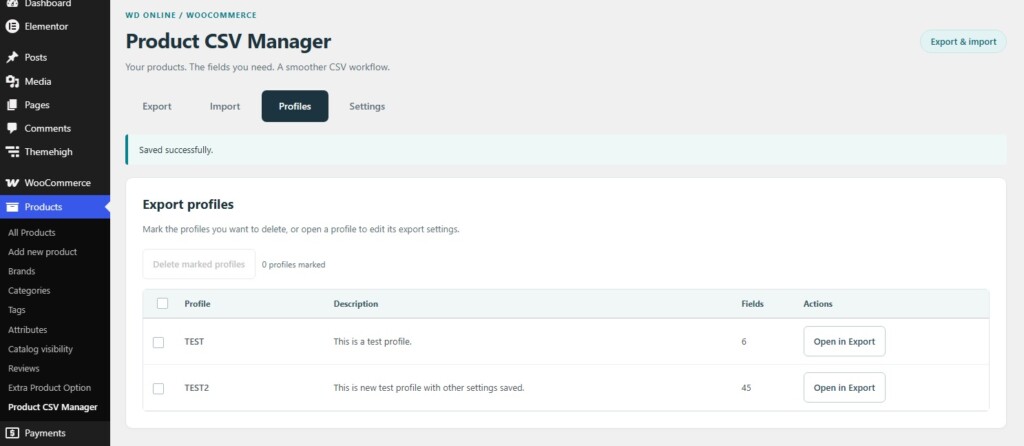
- Save export profiles and update them from any export step.
- Arrange columns with drag and drop or accessible move buttons.
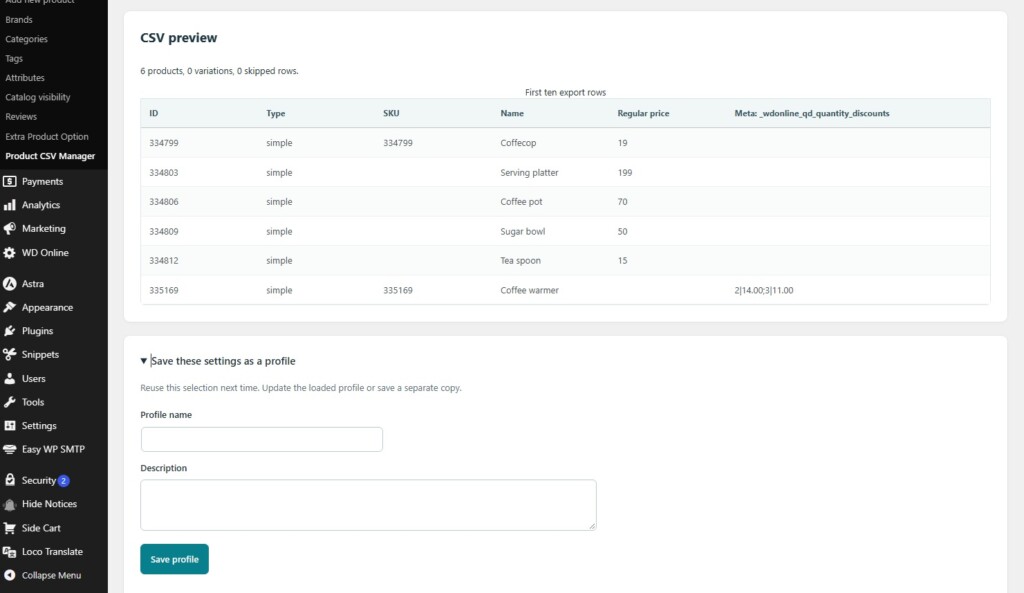
- Preview your CSV or download it directly.
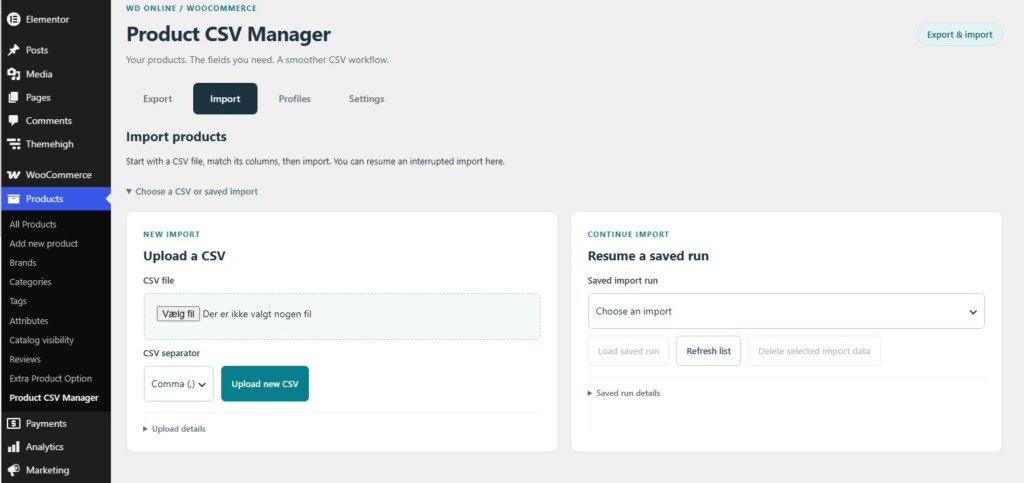
- Import CSV files with automatic column suggestions and editable mapping.
- Create new products, update existing products, or combine both modes.
- Pause imports and resume from saved progress after an interruption.
- Follow progress bars and download a complete import results report.
Selective exports without unnecessary columns
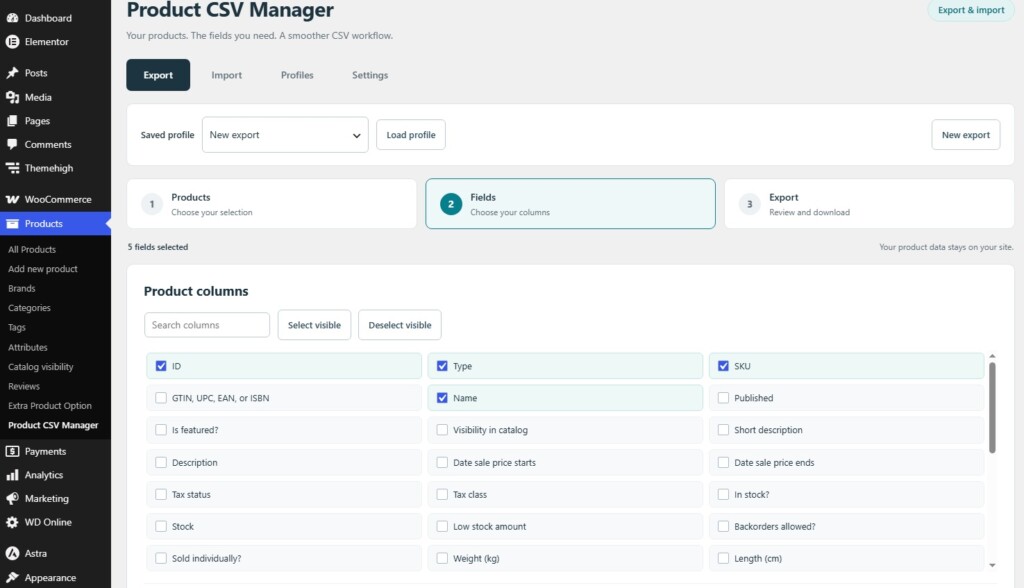
WooCommerce's built-in product exporter offers a broad option to include custom metadata. On a store with many plugins and custom fields, that can produce a spreadsheet with far more columns than you need. WDOnline Product CSV Manager lets you choose custom meta fields individually alongside WooCommerce's standard product columns. Build a CSV containing the information relevant to your task, such as product identifiers, names, prices, stock values, categories, attributes, and selected custom fields. You can also add a custom field by its exact meta key when you already know which field you need.Find and inspect custom product fields
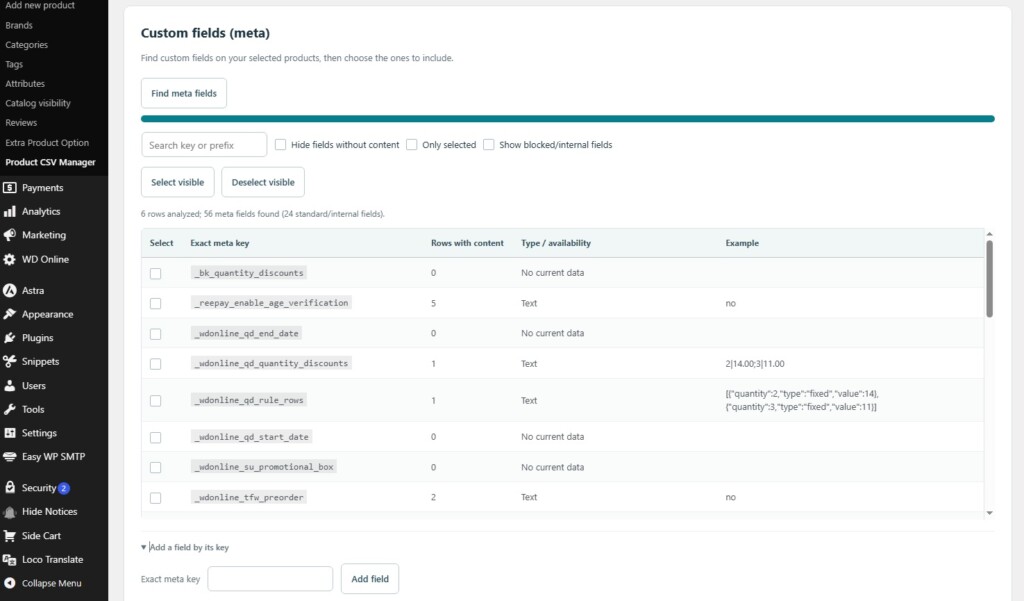
The plugin analyses your selected products in batches to discover their custom meta fields. Search by field name or prefix, see how many selected rows contain a value, and inspect an example before adding a field to your export. Display filters help you focus on selected fields or fields with content. Hiding an empty field in the interface does not remove a selection you have already made. Zero remains a valid value. Stock quantities, prices, and custom fields containing0 are not discarded as empty.
For a cleaner spreadsheet, you can optionally omit selected meta columns that are empty throughout the analysed selection. This option is disabled by default to keep profile columns consistent.
Choose exactly which products to export
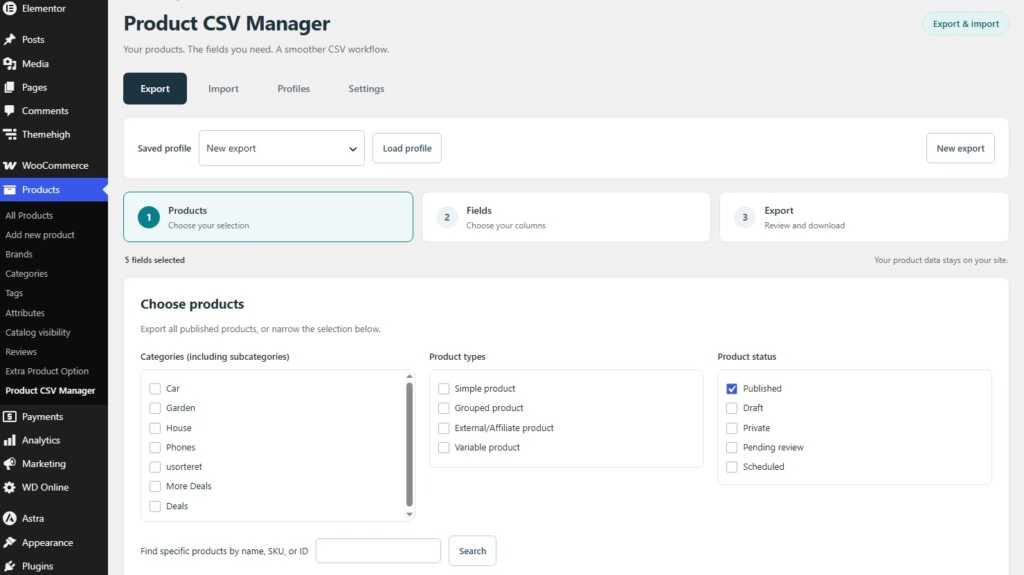
Use straightforward checkboxes to select categories, product types, and product statuses. Category selections include their subcategories at every level. For a smaller selection, search for individual products by name, SKU, or ID. Leave categories and product types unselected to include all products that match the remaining filters. Published products are selected by default. Variations can be exported as separate rows with parent references in WooCommerce's native CSV format. Product type and category filtering follows the parent product, helping you keep variable products and their variations organised.Save profiles for recurring tasks
Create reusable export profiles for the product selections and columns you use regularly. A profile stores your filters, selected fields, column order, CSV separator, and relevant export options. Give each profile a name and description, then load it whenever you need the same setup again. You can save changes to the loaded profile from any of the three export steps or save the current settings as a new profile. The Profiles tab presents saved profiles in a clear list. Open a profile directly in Export, mark individual profiles for deletion, or use the select-all checkbox to remove several profiles together. Profiles retain explicitly selected meta keys even when those fields are absent from the current product selection. Newly discovered fields are not automatically added to a saved profile.Arrange, preview, and download
The export workflow is divided into three steps:- Choose products: define the products you want to include.
- Choose fields: select standard columns and individual custom fields.
- Review and export: arrange the columns, choose your CSV options, and download.
Import product data with clear column mapping
Upload a UTF-8 CSV file and review the suggested column mapping before starting the import. Adjust the mapping or choose Do not import for columns you want to leave untouched. Three import modes are available:- Update existing products only: change products already in your store. This is the default mode.
- Create new products only: add new products without overwriting existing SKUs.
- Create and update: add new products and update matching products in the same import.
Large CSV files with resumable progress
The plugin uploads files in small chunks and processes imports in short batches, with a saved checkpoint after each processed row. This keeps processing focused on the current data rather than loading the entire CSV into memory. If an import is interrupted, reopen the Import tab, load the saved run, and continue from its saved progress. You can also pause after the current request and resume later. Incomplete uploads can be resumed by selecting the original CSV file again. Previously received chunks are checked before missing data is uploaded. Upload and import progress bars show percentage progress, while the import counters show created, updated, failed, and skipped rows. The import percentage reflects the portion of the CSV file processed, rather than an estimated total product count. Files up to 250 MB are supported, subject to your hosting and database capacity. Smaller batches can help when product processing or image downloads are slow. A single slow request may still reach a hosting timeout.Review import results
Errors in individual rows are recorded so you can review them while the import continues with later rows. The interface shows the latest errors and skipped rows. Download the complete results report to see an outcome for every processed row, including the related product ID where available. Correct failed rows and import those corrections in a separate CSV. Completed imports do not automatically retry failed rows. Importing changes products as rows are processed. Pausing or deleting an import run does not undo changes already made. Unmapped fields remain untouched; mapped blank values may clear fields according to WooCommerce's normal import behaviour.Works with WDOnline Quantity Discounts
When WDOnline Quantity Discounts is active, Product CSV Manager supports its direct product quantity-discount field in export and import. Export the quantity pricing data, edit it in your CSV, and map the field when importing it again. Changed quantity prices update the corresponding discount rules, including rules on variations. Unchanged exported quantity prices preserve existing percentage rules, including when the regular product price changes in the same row. This integration requires WDOnline Quantity Discounts; the main import and export features require only WooCommerce.Private data and controlled access
Product snapshots and uploaded CSV data are stored temporarily in your site's database, without public file URLs. Access to operations and downloads is restricted to authorised users, and saved import runs belong to the user who uploaded them. Internal, potential credential, repeated, serialized, and other unsupported complex meta fields are blocked. Ordinary custom fields may still contain sensitive information, so select fields appropriate for the purpose of your export. The plugin does not send telemetry or analytics to external services. Importing mapped image URLs contacts the specified image hosts through WooCommerce's normal image downloader.Built for your WooCommerce administration
Find the plugin under Products → Product CSV Manager. Export, Import, Profiles, and Settings are grouped in one administration area. WDOnline Product CSV Manager works independently of other WD Online plugins, with WooCommerce as its required dependency. It is free to use, with optional donations to support continued development. Download WDOnline Product CSV Manager for WooCommerce and take control of your product CSV workflow.Frequently asked questions
Can I export only selected custom meta fields?
Yes. Select individual meta keys alongside the standard WooCommerce columns, rather than including every available custom field.Are subcategories included?
Yes. Selecting a category includes its descendant categories, including nested subcategories.Can I download without creating a preview?
Yes. Download CSV directly. The plugin automatically analyses the product selection when necessary.Can I resume an interrupted import?
Yes. Load the saved import run and resume from its recorded progress. For an incomplete upload, you must select the original CSV file again. Saved runs remain available for seven days after their last activity.Can I import variable products and variations?
Yes. Import the variable parent products before their variations and provide valid parent references. New variations require unique SKUs and an existing variable parent.Does the plugin support every kind of custom meta?
No. Ordinary scalar custom meta is supported. Internal, potential credential, serialized, repeated, and complex values are blocked unless a supported integration handles the field explicitly.Does deleting an import run delete imported products?
No. It removes that run's stored upload and results, without deleting products or reversing changes already made.Are export profiles private to each user?
No. Profiles are shared with authorised catalogue managers on the same site. Import runs belong to their uploader.Do you have suggestions for improvements to this plugin?
Plugin screenshots

Support WD Online
Our plugins are free. If you find them useful, you can support continued development. You decide the amount yourself and we see any amount as recognition that our plugin helps others.